- AGENTIC
- ENGINEERING
- SOLUTIONS
How to Orchestrate Multi-Agent Workflows on Kubernetes with Conductor
 Nick Lotz Content Engineer
Managing multiple AI agents often starts with installing and using coordinating libraries colocated on a single host. However, the setup quickly evolves into a distributed-systems problem as soon as you want to scale. Insofar as agents hand off work, depend on shared state, and integrate with your production infrastructure, management now requires orchestration tooling. Fundamentally, AI exposes an infrastructure problem we’ve encountered with other types of software we want to deploy.
What is Conductor?
Conductor is an orchestration layer for building agents as durable workflows. It compiles agent definitions into server-side runtime objects, lets you run workers separately from the control plane, and gives you a UI and API for inspecting executions after the fact.
This walkthrough shows how to deploy a real multi-agent team onto Kubernetes with Conductor. Why Kubernetes? Because Kubernetes is the de facto standard for managing and scaling deployed software services, agentic or otherwise.
Here’s what our deployment stack will look like:
- Kubernetes runs the Conductor control plane: the server, service networking, rollout behavior, and the cluster-level infrastructure that keeps the runtime healthy.
- The Conductor method
runtime.deploy(...)is the registration step: it compiles your Python agent team into durable server-side definitions and makes those definitions available to execute later by name. - The method
runtime.serve(...)is the worker step: it keeps your Python tool implementations alive in a separate long-running process so the runtime can dispatch tool work to them when an execution needs it. - The method
runtime.run("registered_name", prompt)is the invocation step: it starts a new execution of a previously deployed agent or team, using the registered name instead of redefining everything inline.
What use case we are building
We are going to deploy a multi-agent research team.
company_research_committee (handoff)└── deep_analysis (parallel) ├── market_analyst └── risk_analystThe coordinator agent decides when a deep review is needed. The deep_analysis agent then fans out to two specialists in parallel: market_analyst and risk_analyst. Each specialist uses a Python tool. That matters, because it forces us to interact with a path where agent definitions and worker processes are distinct concerns. And we want that abstraction!
Operating the workflow looks like:
- Deploy the team definition once
- Keep workers running in a separate process
- Execute the registered team by name
- Inspect the result from both the terminal and the UI
Emphasizing the deploy/serve/run split
In a local or demo environment, it is common to define an agent and run it immediately in the same process. That is fine for trying an idea. It is not how you want to reason about multi-agent infrastructure on Kubernetes.
For a cluster deployment, the cleaner mental model is:
- deploy: compile agent definitions into durable server-side workflow definitions
- serve: run the workers that execute tools and other callbacks
- run: execute a previously deployed agent or team by its registered name
That gives you better separation between CI/CD, long-running worker processes, and the applications that invoke the agent team.
Step 1: (OPTIONAL) Create a K3D cluster
If you want to test these steps out on your local system while modeling a production Kubernetes environment, install K3D and follow the steps below. Otherwise connect to your Kubernetes cluster wherever it may live.
k3d cluster create conductor-blogkubectl config use-context k3d-conductor-blogStep 2: Write the Conductor manifests
Export your LLM/AI provider key. Here we use OpenAI but Conductor supports a variety of LLM providers.
export OPENAI_API_KEY=your_key_hereCreate a namespace and store the provider key as a Kubernetes Secret:
kubectl create namespace conductor-deploykubectl -n conductor-deploy create secret generic conductor-openai \ --from-literal=OPENAI_API_KEY="$OPENAI_API_KEY"Now write the control-plane manifests. Save the following as conductor.yaml:
apiVersion: apps/v1kind: Deploymentmetadata: name: conductor namespace: conductor-deployspec: replicas: 1 selector: matchLabels: app: conductor template: metadata: labels: app: conductor spec: containers: - name: conductor image: conductoross/conductor:3.32.1 ports: - containerPort: 8080 envFrom: - secretRef: name: conductor-openai env: - name: JAVA_TOOL_OPTIONS value: "-Xms512m -Xmx1536m -XX:+UseG1GC -XX:MaxGCPauseMillis=200" readinessProbe: httpGet: path: /health port: 8080 initialDelaySeconds: 30 periodSeconds: 10---apiVersion: v1kind: Servicemetadata: name: conductor namespace: conductor-deployspec: selector: app: conductor ports: - port: 8080 targetPort: 8080Two notes on scope:
- This runs a single replica of the published Conductor image, which bundles the server, the UI, and its own local storage. That is deliberately demo-grade: disposable and fast for a K3D loop.
- For a production deployment you would back the server with external storage and scale it out - see the Conductor deployment docs for the configuration surface. And you would move the provider key into a proper external secret manager rather than a hand-created Secret.
Step 3: Apply and validate the deployment
kubectl apply -f conductor.yamlkubectl -n conductor-deploy rollout status deployment/conductorkubectl -n conductor-deploy get podsThe pod should reach Running with READY 1/1 once the readiness probe passes.
Step 4: Port-forward the service
You want one stable local URL for both the Python SDK and the Conductor UI. We’re not going to worry about managed ingress in this walkthrough.
kubectl port-forward svc/conductor 8080:8080 -n conductor-deployFrom here on out:
- API base URL: http://127.0.0.1:8080/api
- UI root: http://127.0.0.1:8080
Sanity-check the health endpoint:
curl -fsS http://127.0.0.1:8080/healthStep 5: Create a clean Python environment and install the SDK from PyPI
Now, install the Conductor client SDK.
mkdir -p ~/conductor-k8s-appcd ~/conductor-k8s-apppython3 -m venv .venvsource .venv/bin/activatepython -m pip install --upgrade pippip install conductor-python==2.0.0Then point the SDK at the port-forwarded server:
export CONDUCTOR_SERVER_URL=http://127.0.0.1:8080/apiexport AGENT_LLM_MODEL=openai/gpt-4o-miniStep 6: Define the multi-agent team
Now, we build!
Create team_definition.py:
from __future__ import annotations
import os
from conductor.ai.agents import Agent, Strategy, tool

LLM_MODEL = os.environ.get("AGENT_LLM_MODEL", "openai/gpt-4o-mini")

@tooldef fetch_market_signals(company: str) -> dict:    """Return deterministic market context for a company under review."""    return {        "company": company,        "market_size_usd": "18B",        "growth_rate": "22% YoY",        "top_competitors": ["NovaCloud", "ScaleForge", "PulseStack"],        "customer_pull": "Enterprise platform teams want faster incident automation",    }

@tooldef fetch_risk_flags(company: str) -> dict:    """Return deterministic risk context for a company under review."""    return {        "company": company,        "regulatory_risk": "medium",        "technical_risk": "medium",        "competitive_risk": "high",        "key_concern": "Large incumbents can bundle adjacent observability features",    }

market_analyst = Agent(    name="market_analyst",    model=LLM_MODEL,    tools=[fetch_market_signals],    instructions=(        "You are a market analyst. Use fetch_market_signals exactly once and summarize "        "market size, demand, and competitive context in 3 concise bullets."    ),)

risk_analyst = Agent(    name="risk_analyst",    model=LLM_MODEL,    tools=[fetch_risk_flags],    instructions=(        "You are a risk analyst. Use fetch_risk_flags exactly once and summarize the top risks "        "in 3 concise bullets."    ),)

deep_analysis = Agent(    name="deep_analysis",    model=LLM_MODEL,    agents=[market_analyst, risk_analyst],    strategy=Strategy.PARALLEL,)

coordinator = Agent(    name="company_research_committee",    model=LLM_MODEL,    agents=[deep_analysis],    strategy=Strategy.HANDOFF,    instructions=(        "You coordinate a company diligence review. Hand off to deep_analysis for any request "        "that asks for a technical business assessment. Return a short recommendation with "        "sections named verdict and rationale."    ),)
There are two deliberate choices in this file to make the run structurally interesting.
- the top-level coordinator uses Strategy.HANDOFF
- the nested
deep_analysisagent uses Strategy.PARALLEL
Step 7: Deploy the team definition once
Create deploy_team.py:
from __future__ import annotations
from pathlib import Path
from conductor.ai.agents import AgentRuntime
from team_definition import coordinator

REGISTERED_NAME_FILE = Path("/tmp/conductor_company_research.registered_name")

if __name__ == "__main__":    with AgentRuntime() as runtime:        deployment = runtime.deploy(coordinator)[0]        REGISTERED_NAME_FILE.write_text(deployment.registered_name + "\n", encoding="utf-8")        print(f"agent_name={deployment.agent_name}")        print(f"registered_name={deployment.registered_name}")
Run it:
python deploy_team.pyExpected output you should see is:
agent_name=company_research_committeeregistered_name=company_research_committeeThis is one of the subtle but important details: deploy() gives you registered_name, and that is the thing you will feed to runtime.run(...) to invoke the agent later.
Step 8: Serve the Python workers in a separate process
Create serve_team.py:
from __future__ import annotations
from conductor.ai.agents import AgentRuntime
from team_definition import coordinator

if __name__ == "__main__":    with AgentRuntime() as runtime:        print("Serving Python workers for company_research_committee")        runtime.serve(coordinator)
Run it in its own terminal:
python serve_team.pyOn the validated run, the important lines should look like:
Serving Python workers for company_research_committeeServing 2 worker(s) for 1 agent(s). Press Ctrl+C to stop.Conductor Worker[name=fetch_market_signals, ...]Conductor Worker[name=fetch_risk_flags, ...]This is the key separation to notice. Deployment already put the agent definition on the server. This process is not defining or starting the agent, it is only serving the Python workers that execute tool tasks.
Step 9: Execute the registered team by name
Create run_team.py:
from __future__ import annotations
from pathlib import Path
from conductor.ai.agents import AgentRuntime

REGISTERED_NAME_FILE = Path("/tmp/conductor_company_research.registered_name")
PROMPT = (    "Perform a deep analysis of Acme Observability as an acquisition target for an enterprise "    "automation platform. Focus on market upside, key risks, and whether the deal is worth "    "taking to an investment committee.")

registered_name = REGISTERED_NAME_FILE.read_text(encoding="utf-8").strip()

if __name__ == "__main__":    with AgentRuntime() as runtime:        result = runtime.run(registered_name, PROMPT)        print(f"registered_name={registered_name}")        print(f"execution_id={result.execution_id}")        print(f"status={result.status}")        print("result:")        print(result.output["result"])
Run it:
python run_team.pyThe validated run should complete with:
registered_name=company_research_committeeexecution_id=YOUR_EXECUTION_IDstatus=COMPLETEDThat execution_id is the handle you now care about in the UI and the API.
Step 10: Inspect the run from the server side
A good first API check is the execution search endpoint:
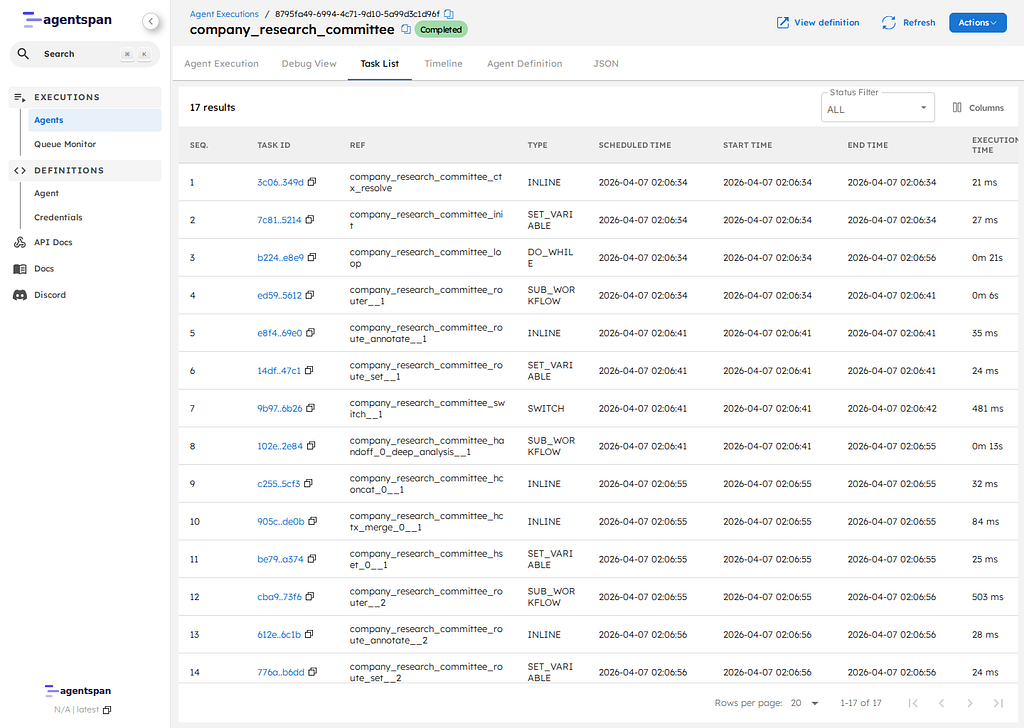
curl -fsS "http://127.0.0.1:8080/api/agent/executions?start=0&size=10"The following should show as first-class executions :
company_research_committeedeep_analysismarket_analystrisk_analyst
For the completed top-level execution, you can also check:
curl -fsS "http://127.0.0.1:8080/api/agent/executions/YOUR_EXECUTION_ID"That response should include:
- the top-level executionId
status=COMPLETED- the final result payload
- per-agent context attached to the output
Step 11: Inspect the same run in the UI
Now open the UI:
- Executions list: http://127.0.0.1:8080/executions
- Execution detail:
http://127.0.0.1:8080/execution/YOUR_EXECUTION_ID
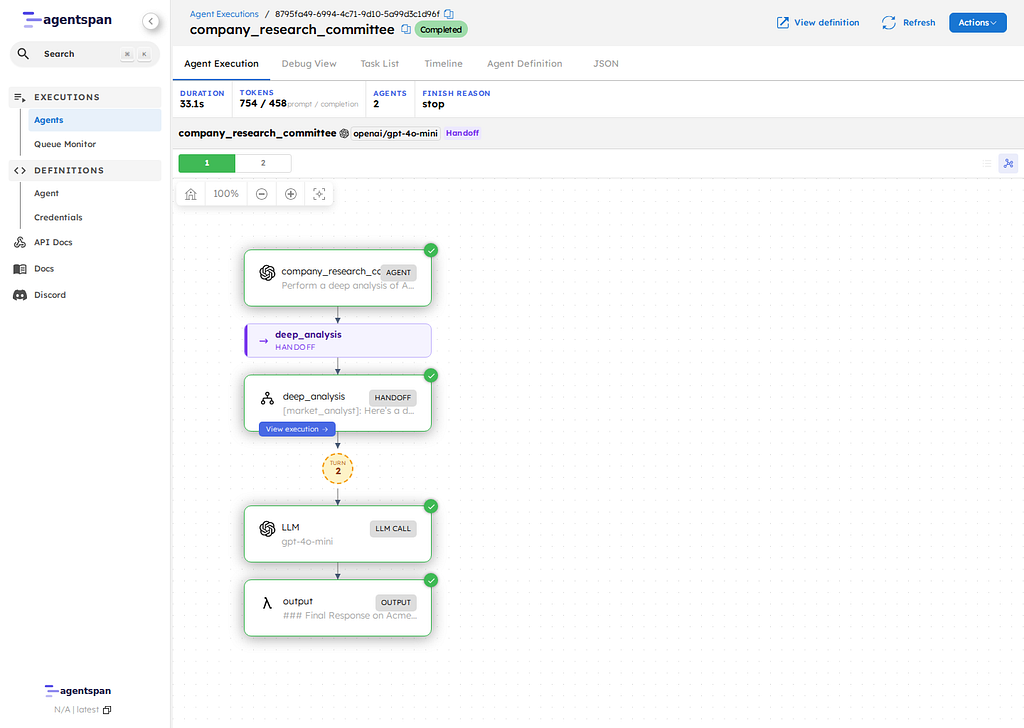
Tip: click into the Timeline tab to clearly see where any handoffs and parallel executions occur.
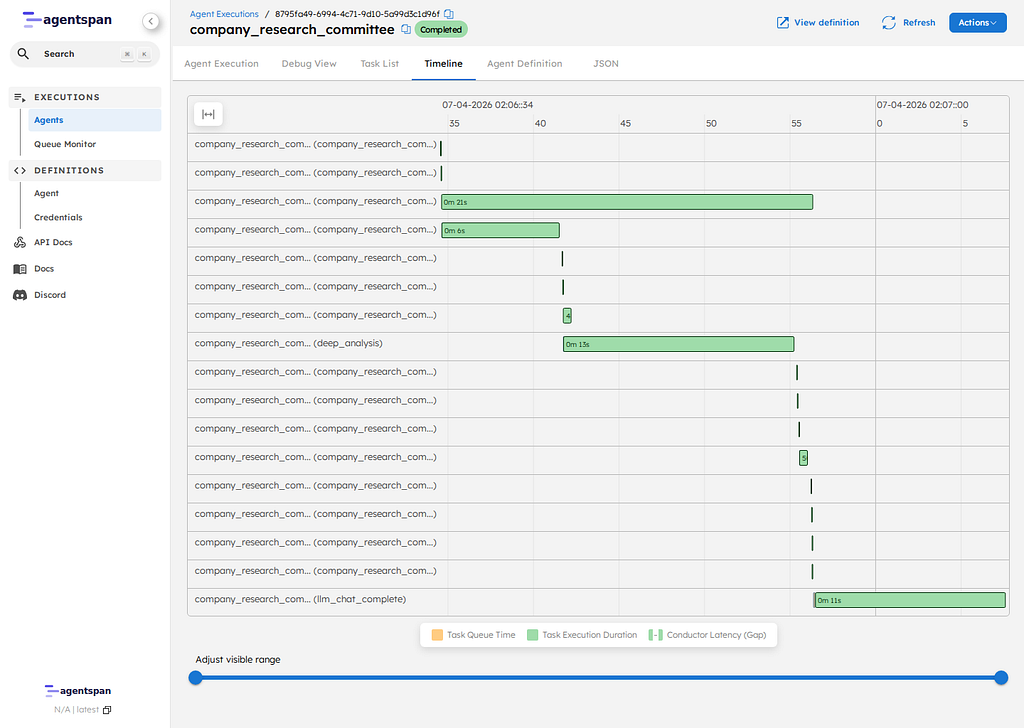
The executions view shows that the coordinator and the nested agents are visible as separate managed executions, not hidden inside one black box.
The execution detail page is where the more interesting proof lives. The Timeline tab is the clearest static view of what actually happened.
What we’ve shown
We built a setup where:
- Conductor can register a multi-agent team onto a Kubernetes-hosted control plane
- Python workers can be served as a separate long-running process
- The top-level team can be executed later by registered name
- Nested agents show up as inspectable runtime units
That separation lets you think clearly about CI/CD, worker scaling, and runtime debugging.
Conclusion
This walkthrough covered the basic Kubernetes operating model for Conductor. The control plane runs in the cluster through plain Kubernetes manifests. Agent definitions are registered separately, Python tool workers run as their own long-lived process, and new executions are started later.
For a first deployment, that split is the main idea to retain. Agent definitions, worker processes, and executions are different lifecycle concerns, and Conductor exposes them as such. That makes it easier to reason about CI/CD, worker scaling, execution history, and runtime debugging than if all three concerns were collapsed into a single process.