Masking Parameters
5-minute path
Store long-lived credentials as secrets, reference them with ${workflow.secrets.<secretName>}, and use _masked, _secrets, or maskedFields for sensitive runtime values.
Masking sensitive data
When a value is masked, it is replaced with ***, hiding confidential information in workflow executions.
For example:
This is displayed in the workflow execution as:
For example:
This is displayed in the workflow execution as:
Note
Available since v5.1.18 and later / v4.1.68 and later.
Use the maskedFields parameter to specify which fields to mask during execution. Include the name of each field you want to mask as an element in the array.
For example:
In the workflow execution, the fields are displayed as:
Passing sensitive data between tasks
To pass sensitive data from one task's output to a subsequent task, nest the sensitive fields inside either the _secrets or _masked object in the receiving task's input parameters as follows:
See the complete example in Passing sensitive data between tasks.
Masking secret references and secret values
The system masks fields that reference workflow secrets during execution. To reference a workflow secret, use the following syntax:
where <secretName> is the name of your secret.
When the system resolves these expressions, it replaces their values with *** anywhere they appear, including workflow inputs, task inputs, task outputs, and the execution JSON.
For example,
is displayed during execution as
Resolved secret values are always masked, regardless of the context. This ensures that the underlying secret value is never exposed at any point in the workflow execution.
Note
Secrets used within task expressions, such as in Inline scripts or JSON JQ Transform expressions, are also masked during execution. When a secret is referenced or resolved inside an expression, its value is replaced with *** in task inputs, task outputs, and the execution details.
Workflow behavior with masked parameters
Masking affects restart and archive behavior:
| Mechanism | Restart/archive behavior |
|---|---|
_masked |
Retained during archiving, so restarts can still use the original value. |
_secrets |
Permanently replaced with *** during archiving. Restarting may fail if downstream tasks still require the original value. |
maskedFields |
Permanently replaced with *** during archiving. Restarting may fail if the field is required later. |
For long-running or restartable workflows, prefer workflow secrets for durable credentials and _masked for runtime values that a restart may need.
Examples
Using _secrets parameter
Consider a workflow with a task having an input masked using _secrets:
Here's the complete workflow definition:
{
"name": "workflow-with-secrets-param",
"description": "Sample workflow containing _secrets params",
"version": 1,
"tasks": [
{
"name": "simple",
"taskReferenceName": "simple_ref",
"inputParameters": {
  "_secrets": "${workflow.input.somedata}"
},
"type": "SIMPLE"
}
],
"inputParameters": ["somedata"],
"schemaVersion": 2
}
When you run the workflow, the system masks the parameters in the execution results within the task input and the workflow input.
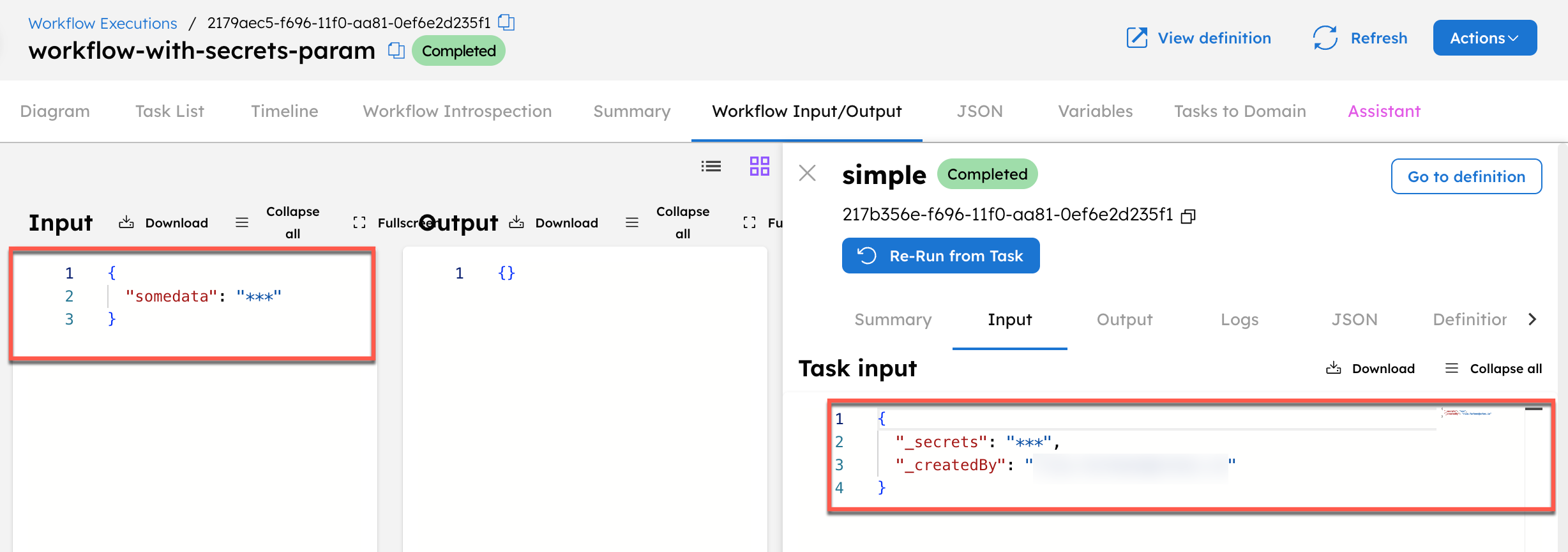
Using _masked parameter
Consider a workflow with a task having an input parameter masked using _masked:
Here's the complete workflow definition:
{
"name": "workflow-with-masked-param",
"description": "Sample workflow containing _masked params",
"version": 1,
"tasks": [
{
"name": "simple",
"taskReferenceName": "simple_ref",
"inputParameters": {
  "_masked": "${workflow.input.somedata}"
},
"type": "SIMPLE"
}
],
"inputParameters": ["somedata"],
"schemaVersion": 2
}
When you run the workflow, the system masks the parameters in the execution results within the task input and the workflow input.
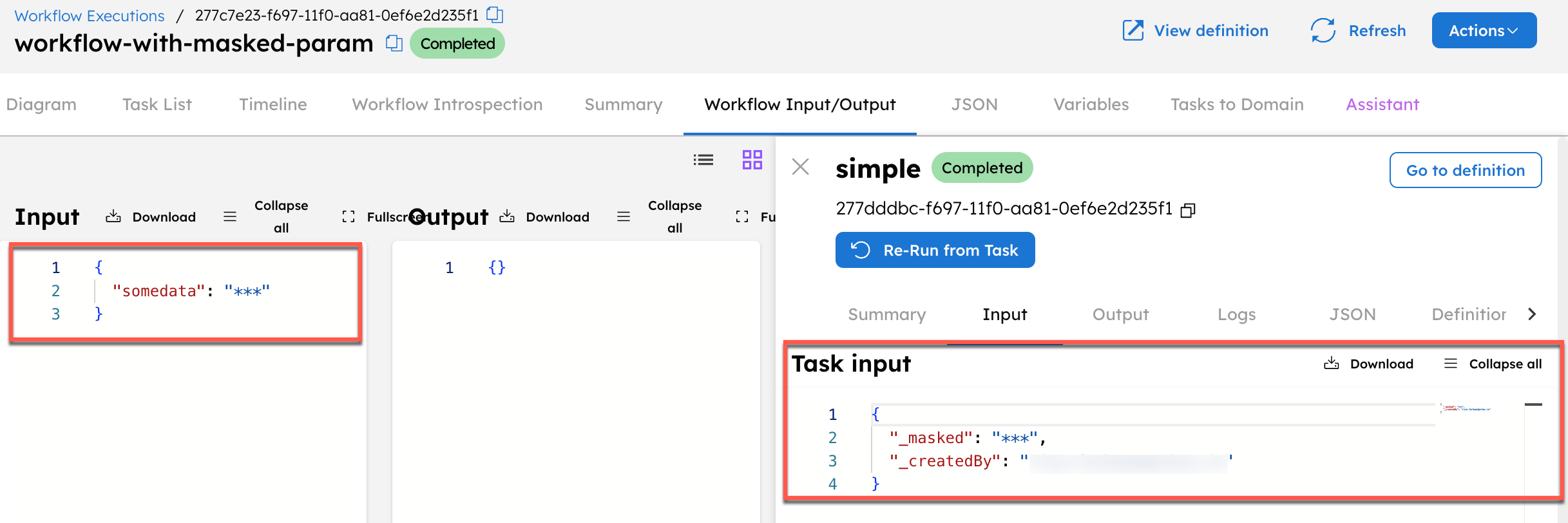
Using maskedFields parameter
Consider a workflow definition with input parameters input1 and input2, and output parameter output1.
{
  "name": "newMaskingParam",
  "description": "Workflow for testing new masking params",
  "version": 1,
  "tasks": [
    {
      "name": "http",
      "taskReferenceName": "http_ref",
      "inputParameters": {
        "uri": "https://orkes-api-tester.orkesconductor.com/api",
        "method": "GET",
        "accept": "application/json",
        "contentType": "application/json",
        "encode": true
      },
      "type": "HTTP"
    }
  ],
  "inputParameters": ["input1", "input2"],
  "outputParameters": {
    "output1": "${http_ref.output}"
  },
  "schemaVersion": 2,
  "maskedFields": ["input1", "input2"]
}
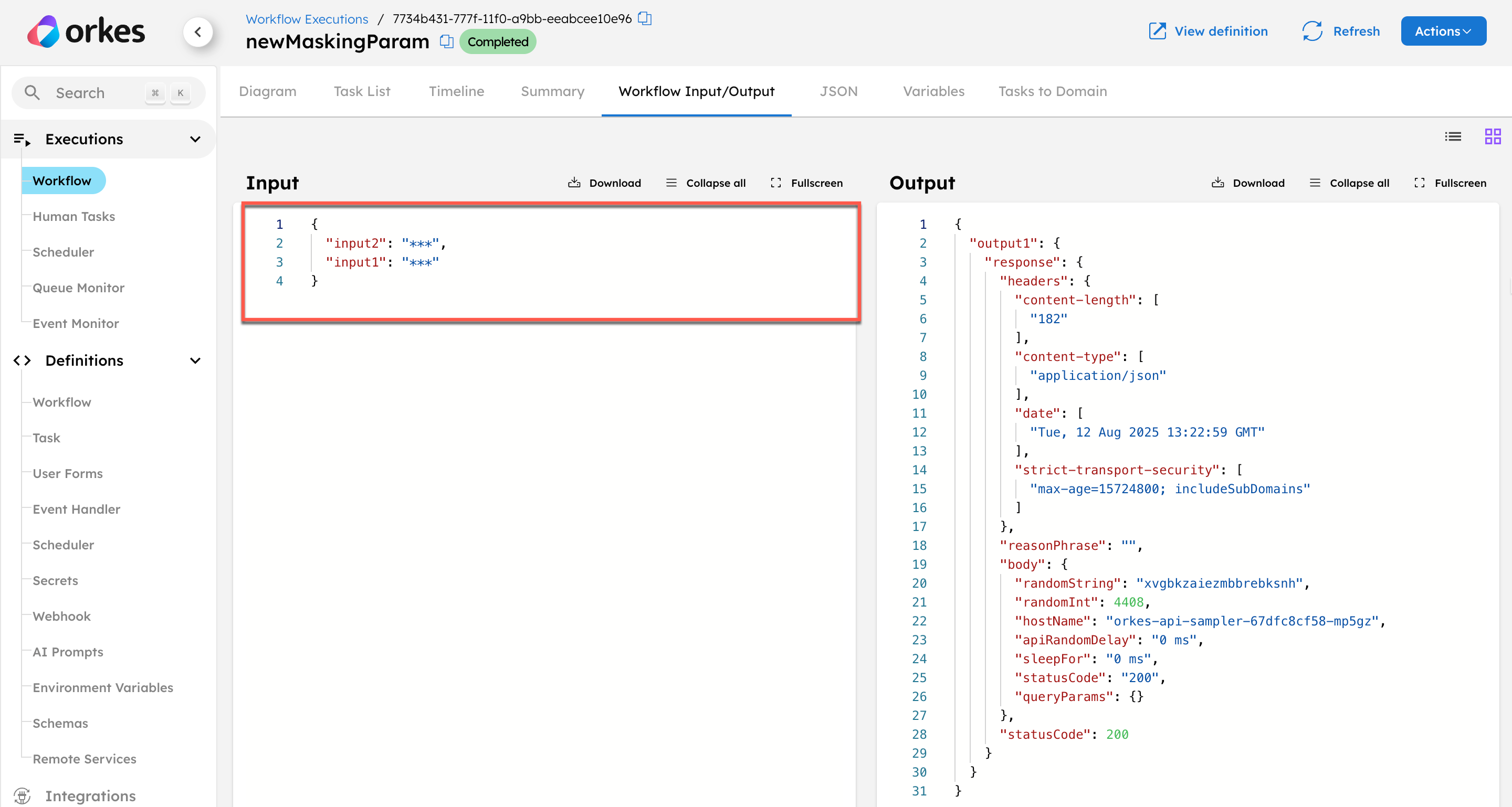
In this example, both input fields are masked using:
After running the execution, the values for input1 and input2 appear as *** in the workflow input, confirming that the masking is applied successfully.
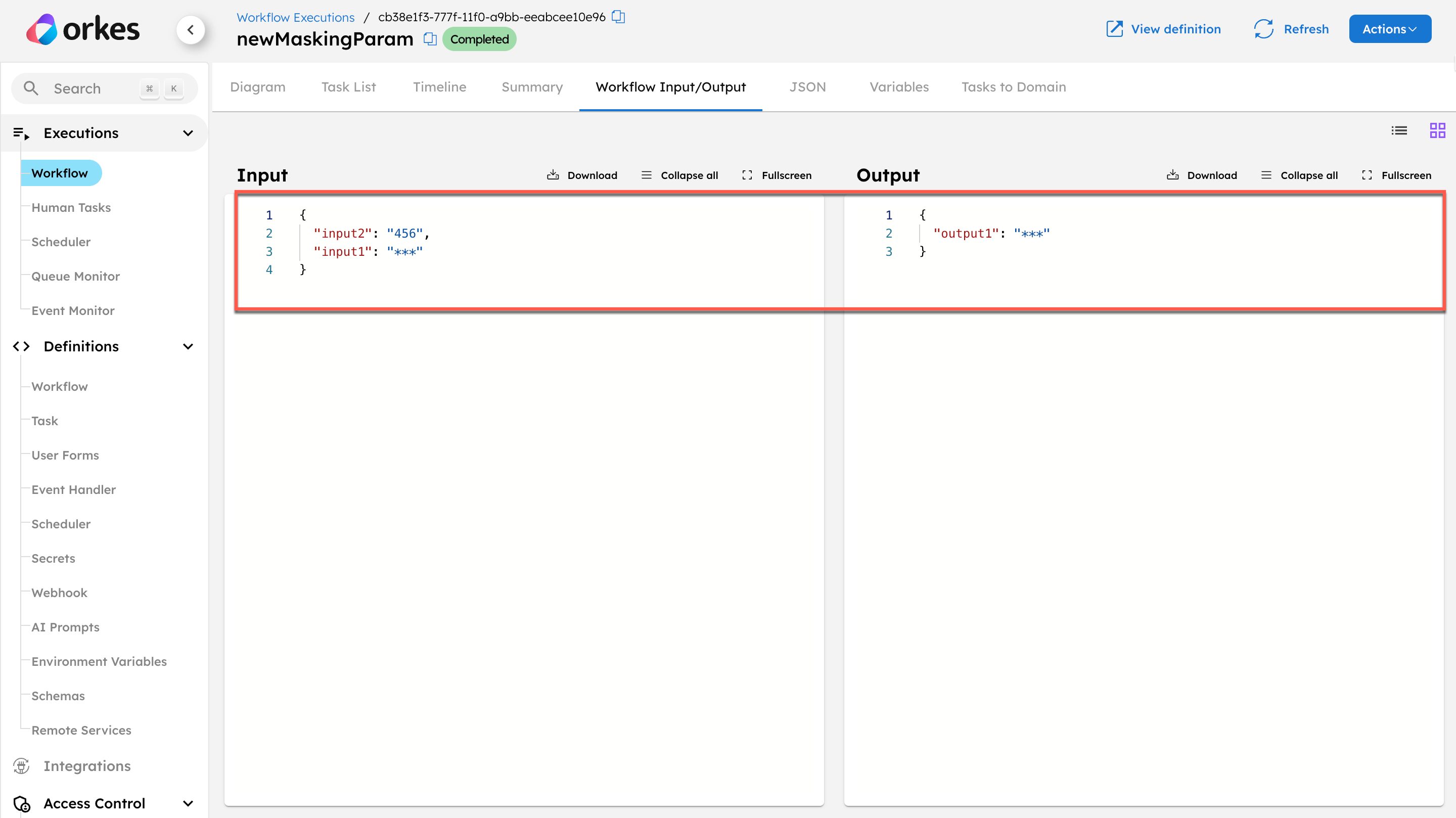
Next, update the workflow definition to mask the input1 and output1 parameters:
When you run the execution, input1 and output1 are masked.
Passing sensitive data between tasks
Consider a workflow where a sensitive value from one task's output needs to be passed to another task. To ensure the data remains masked, nest the parameter under _secrets in the receiving task's input parameters.
{
  "name": "workflow-pass-sensitive-data",
  "description": "Workflow passing sensitive parameters between tasks",
  "version": 1,
  "tasks": [
    {
      "name": "simple-demo",
      "taskReferenceName": "simple_demo_ref",
      "type": "SIMPLE"
    },
    {
      "name": "simple",
      "taskReferenceName": "simple_ref",
      "inputParameters": {
        "_secrets": {
          "parameter": "${simple_demo_ref.output.result}"
        }
      },
      "type": "SIMPLE"
    }
  ],
  "schemaVersion": 2
}
Note
You can also use the _masked parameter to mask the data in this scenario.
When you run this workflow, the system masks the sensitive data from simple_demo_ref.output.result in the execution results because it is nested under _secrets as the input parameter to the second task.
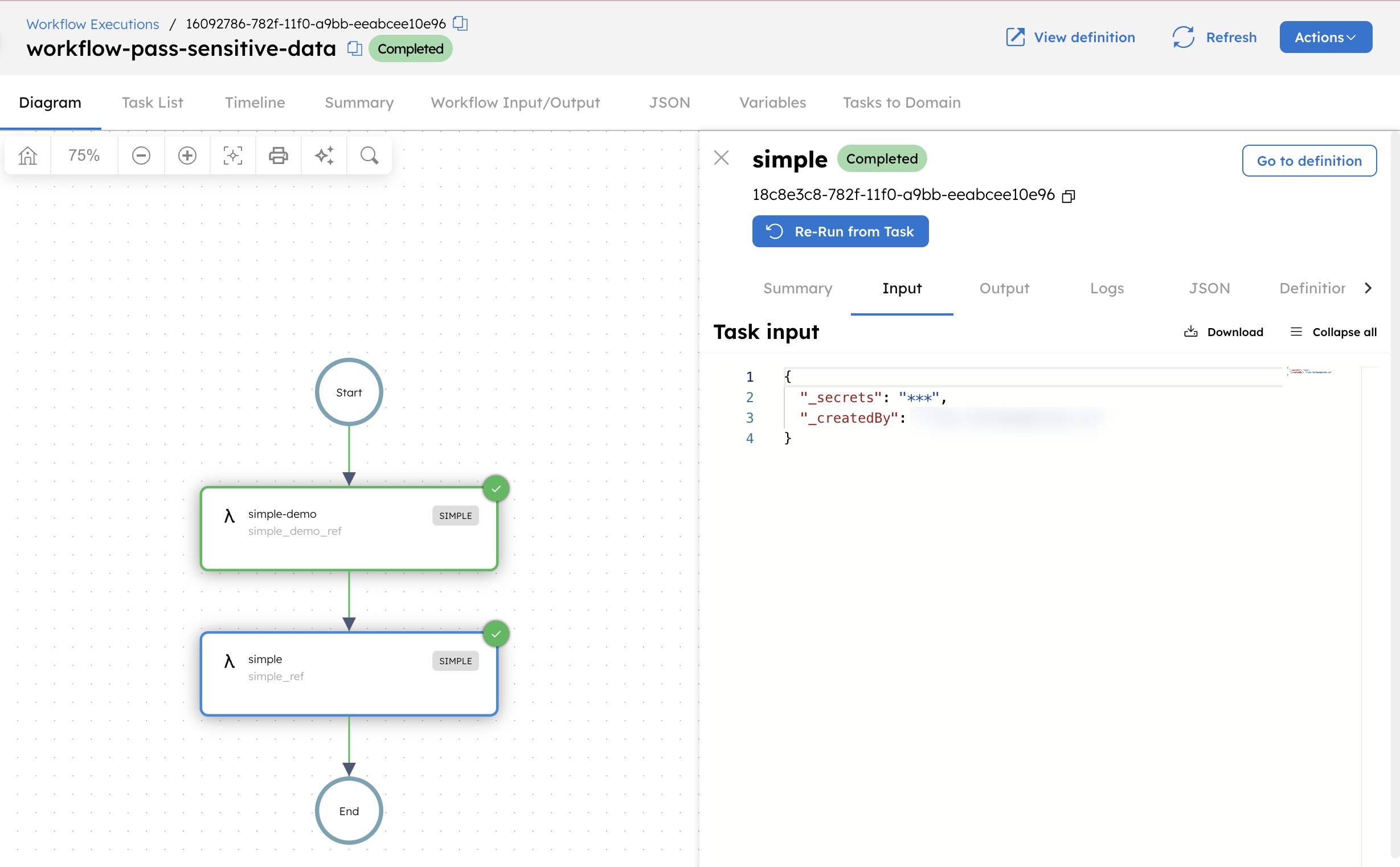
Masking secret references in workflow definitions
The following workflow calls an external payments API. The HTTP task sends an Authorization header that uses a secret stored as payment_api_token in the workflow secrets.
Store the API token as a secret in Conductor by navigating to Definitions > Secrets.
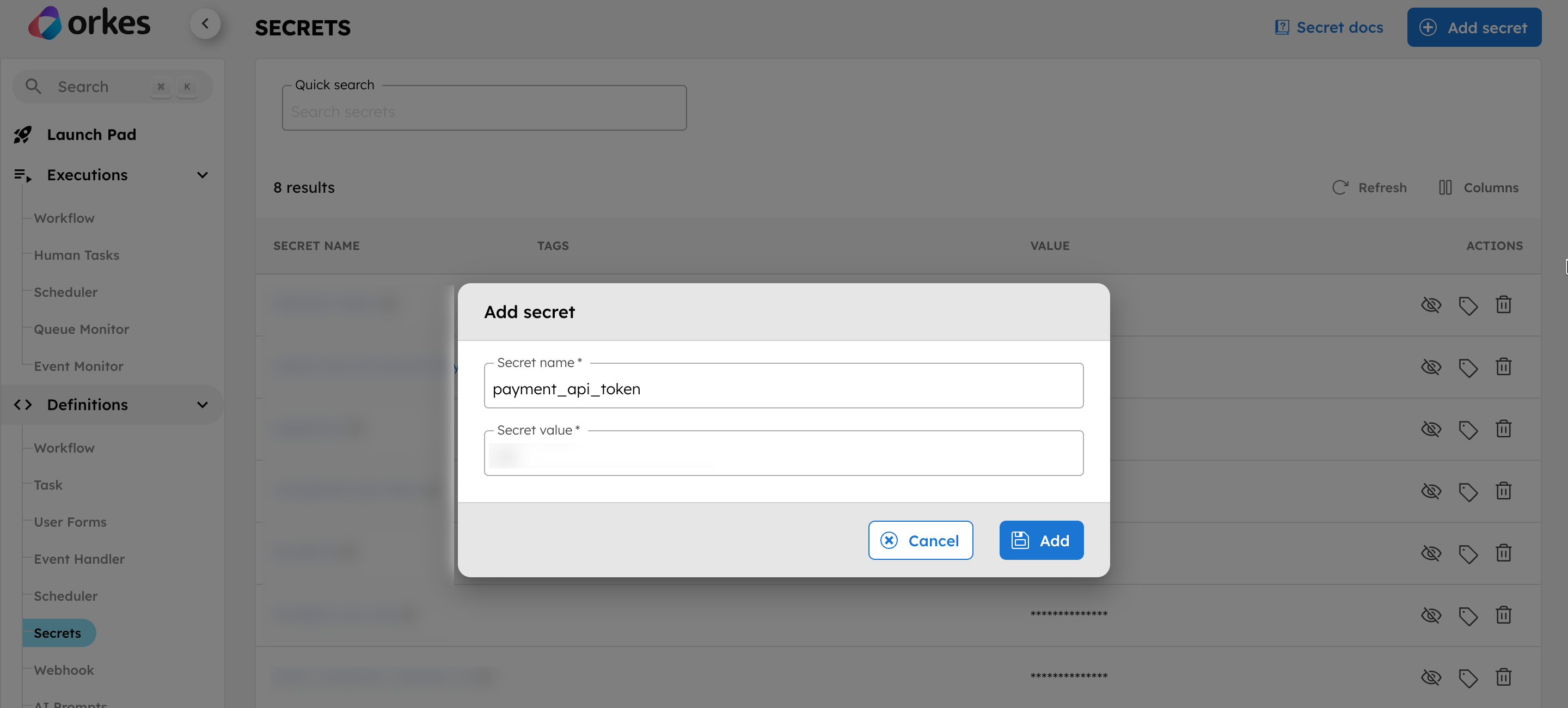
Next, create the workflow under Definitions > Workflow using the following definition:
{
  "name": "charge_customer",
  "description": "Charge a customer using an external payments API",
  "version": 1,
  "tasks": [
    {
      "name": "charge_payment",
      "taskReferenceName": "charge_payment_ref",
      "type": "HTTP",
      "inputParameters": {
        "uri": "https://orkes-api-tester.orkesconductor.com/api",
        "method": "POST",
        "headers": {
          "Authorization": "Bearer ${workflow.secrets.payment_api_token}",
          "Content-Type": "application/json"
        },
        "body": {
          "customerId": "${workflow.input.customerId}",
          "amount": "${workflow.input.amount}",
          "currency": "USD"
        }
      }
    }
  ],
  "inputParameters": ["customerId", "amount"],
  "schemaVersion": 2
}
In this workflow, the Authorization header retrieves its value from the secret using "Authorization": "Bearer ${workflow.secrets.payment_api_token}".
During execution, the task input appears as:
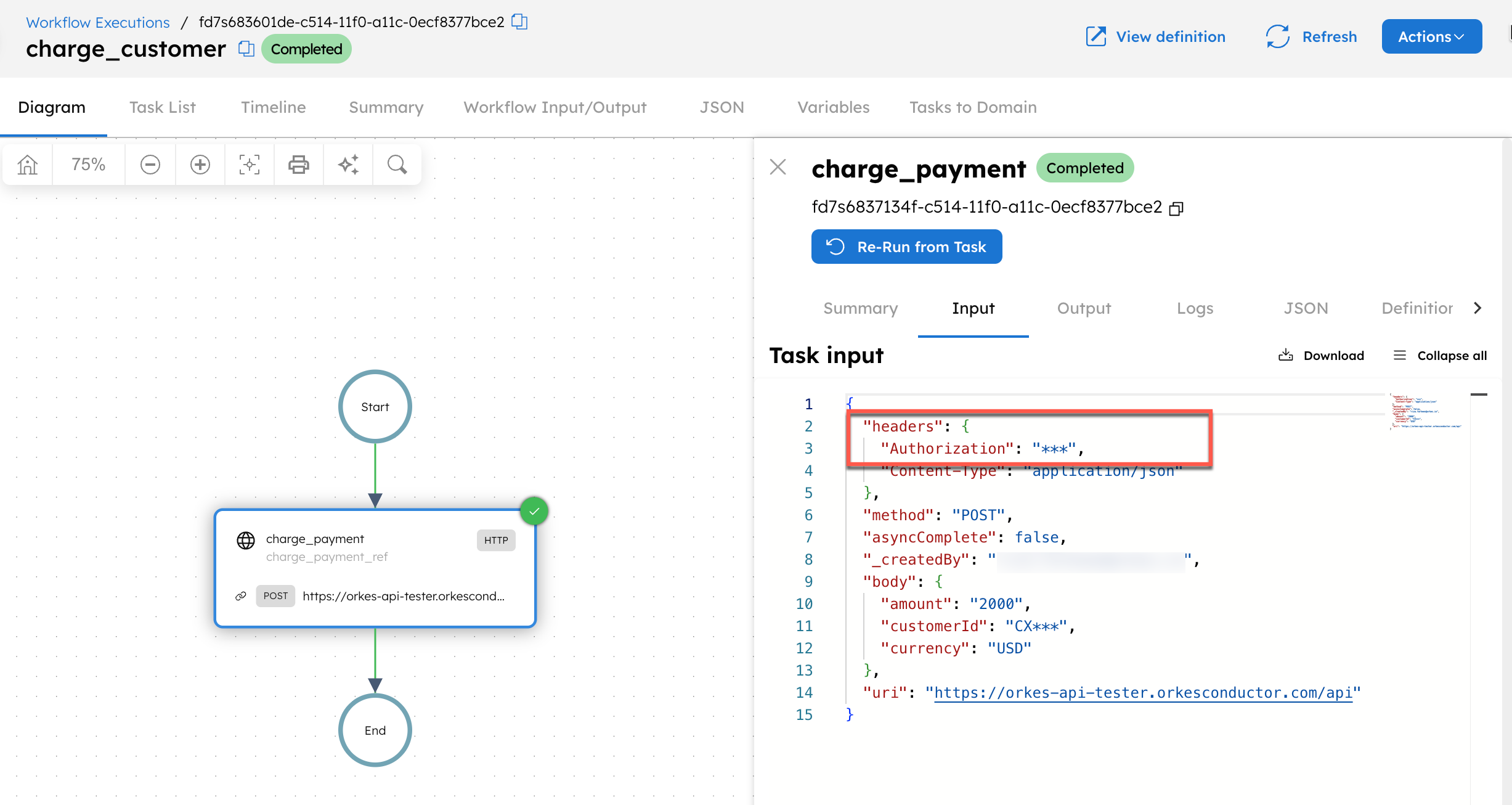
The Authorization header value is masked because it resolves from ${workflow.secrets.payment_api_token}. Any occurrence of this secret value elsewhere is automatically masked as well.