Get Workflow
Note
The Get Workflow task succeeds only if the user who started the workflow has at least read permission on the target workflow's definition. Otherwise, the task fails with:
Task parameters
Configure these parameters for the Get Workflow task.
| Parameter | Description | Required/ Optional |
|---|---|---|
| inputParameters. id | The ID of the workflow execution to retrieve. It can be passed as a dynamic variable. If the ID is missing or blank, the task fails with Missing/Blank 'id' in input parameters. If no workflow exists with the ID, the task fails with Wrong Workflow id. |
Required. |
| inputParameters. includeTasks | Whether to include the task details of the workflow execution in the output. The value must be a boolean (true or false), not a string. The default value is true. |
Optional. |
The following are generic configuration parameters that can be applied to the task and are not specific to the Get Workflow task.
Other generic parameters
Here are other parameters for configuring the task behavior.
| Parameter | Description | Required/ Optional |
|---|---|---|
| optional | Whether the task is optional. If set to true, any task failure is ignored, and the workflow continues with the task status updated to COMPLETED_WITH_ERRORS. However, the task must reach a terminal state. If the task remains incomplete, the workflow waits until it reaches a terminal state before proceeding. |
Optional. |
Task configuration
This is the task configuration for a Get Workflow task.
{
  "name": "get_workflow",
  "taskReferenceName": "get_workflow_ref",
  "inputParameters": {
    "id": "<WORKFLOW-ID>",
    "includeTasks": true
  },
  "type": "GET_WORKFLOW"
}
Task output
The Get Workflow task returns the execution details of the specified workflow in the workflow object. This includes fields such as status, input, output, and workflowDefinition. If includeTasks is true, it also includes the tasks array. For example, use ${get_workflow_ref.output.workflow.status} to reference the workflow status in a later task.
Examples
Here are some examples for using the Get Workflow task.
Using the Get Workflow task in a workflow
The following example demonstrates how to configure a workflow that retrieves the details of another workflow execution.
To create a workflow:
- Go to Definitions > Workflow, from the left navigation menu on your Conductor cluster.
- Select + Define workflow.
- In the Code tab, paste the following workflow definition:
{
 "name": "GetWorkflowDemo",
 "description": "Sample Workflow",
 "version": 1,
 "tasks": [
   {
     "name": "get_workflow",
     "taskReferenceName": "get_workflow_ref",
     "inputParameters": {
       "id": "${workflow.input.workflowId}",
       "includeTasks": true
     },
     "type": "GET_WORKFLOW"
   }
 ],
 "inputParameters": [
   "workflowId"
 ],
 "schemaVersion": 2
}
- Select Save > Confirm.
To run the workflow:
- Go to the Run tab, and enter the Input params, replacing
<WORKFLOW-ID>with the ID of an existing workflow execution:
- Select Execute.
Once the workflow starts, the Get Workflow task retrieves the details of the specified workflow execution.
To verify the result, select the Get Workflow task in the execution view and open the Output tab. The output contains the workflow execution details for the provided workflow ID.
If Include tasks is set to true, the output also includes the list of tasks associated with the workflow execution. If set to false, only workflow-level metadata is returned.
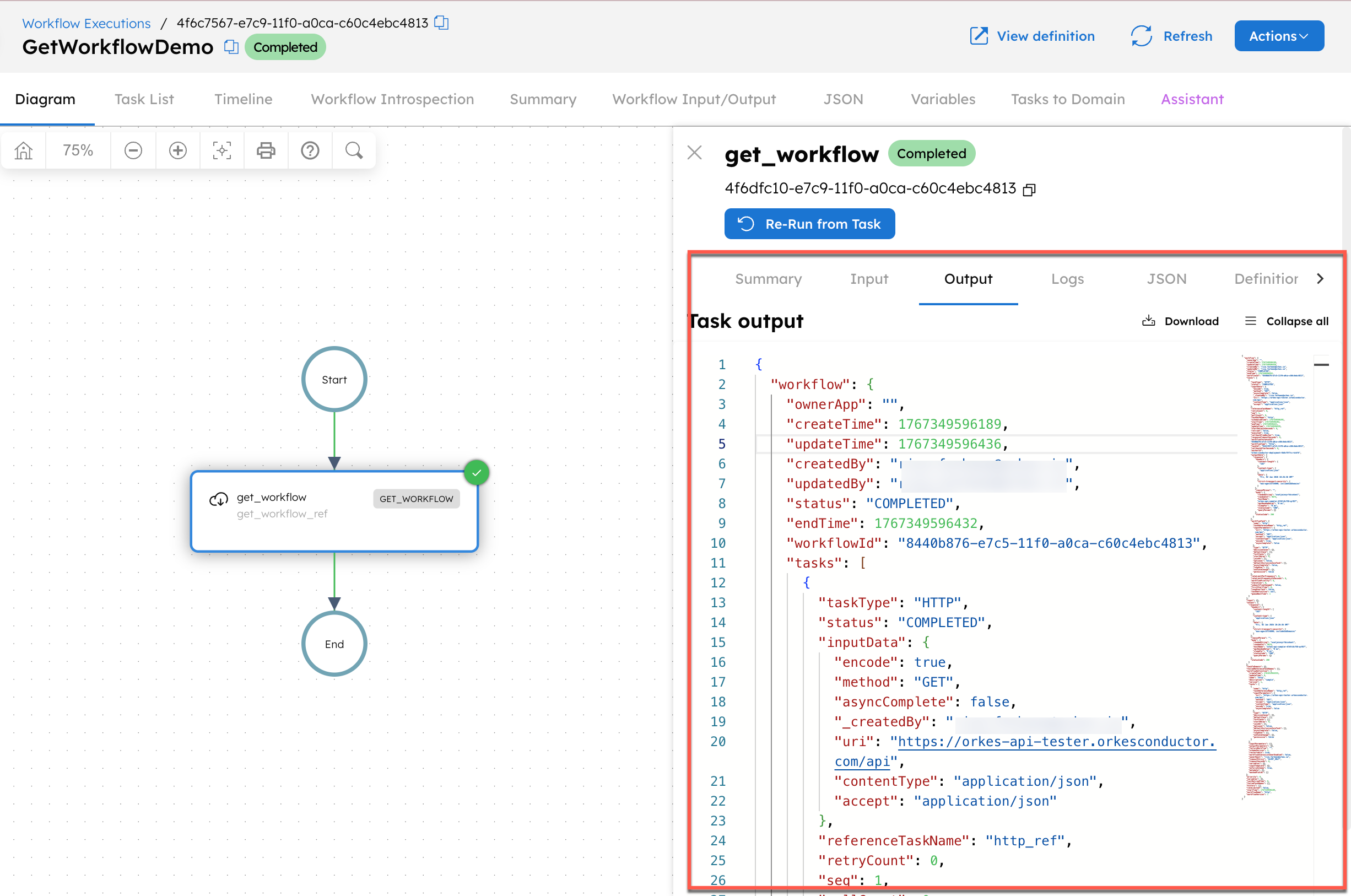
This allows you to inspect the current state, status, and execution details of an existing workflow from within another workflow.